Loading scikit-learn's MNIST Hand-Written Dataset
Goal
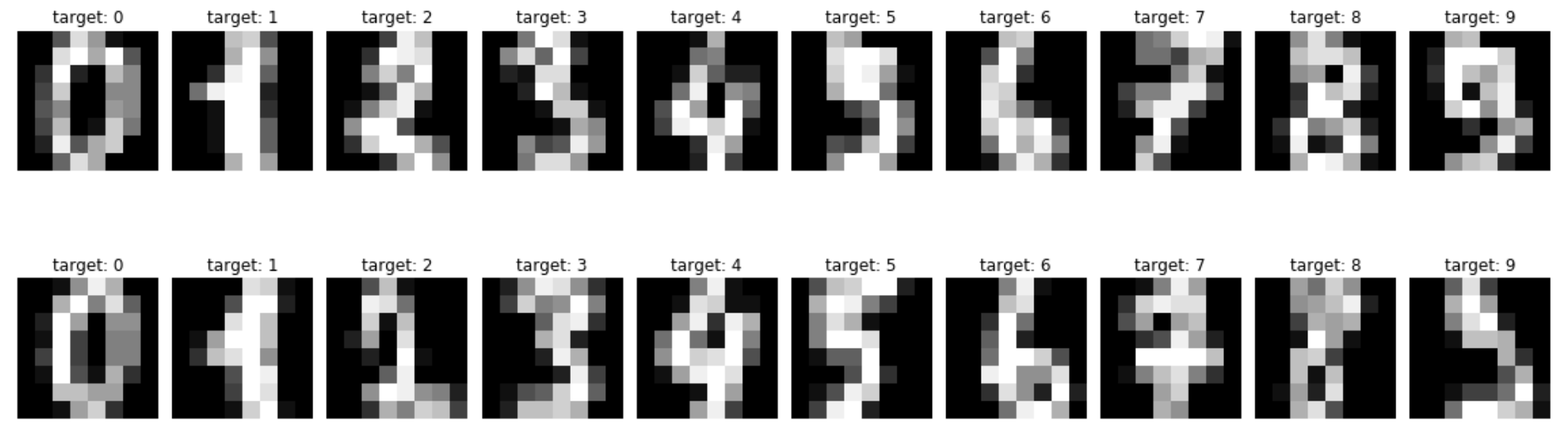
This post aims to introduce how to load MNIST (hand-written digit image) dataset using scikit-learn
Refernce
This post aims to introduce how to load MNIST (hand-written digit image) dataset using scikit-learn
Refernce
This post aims to introduce activation functions used in neural networks using pytorch.

Reference
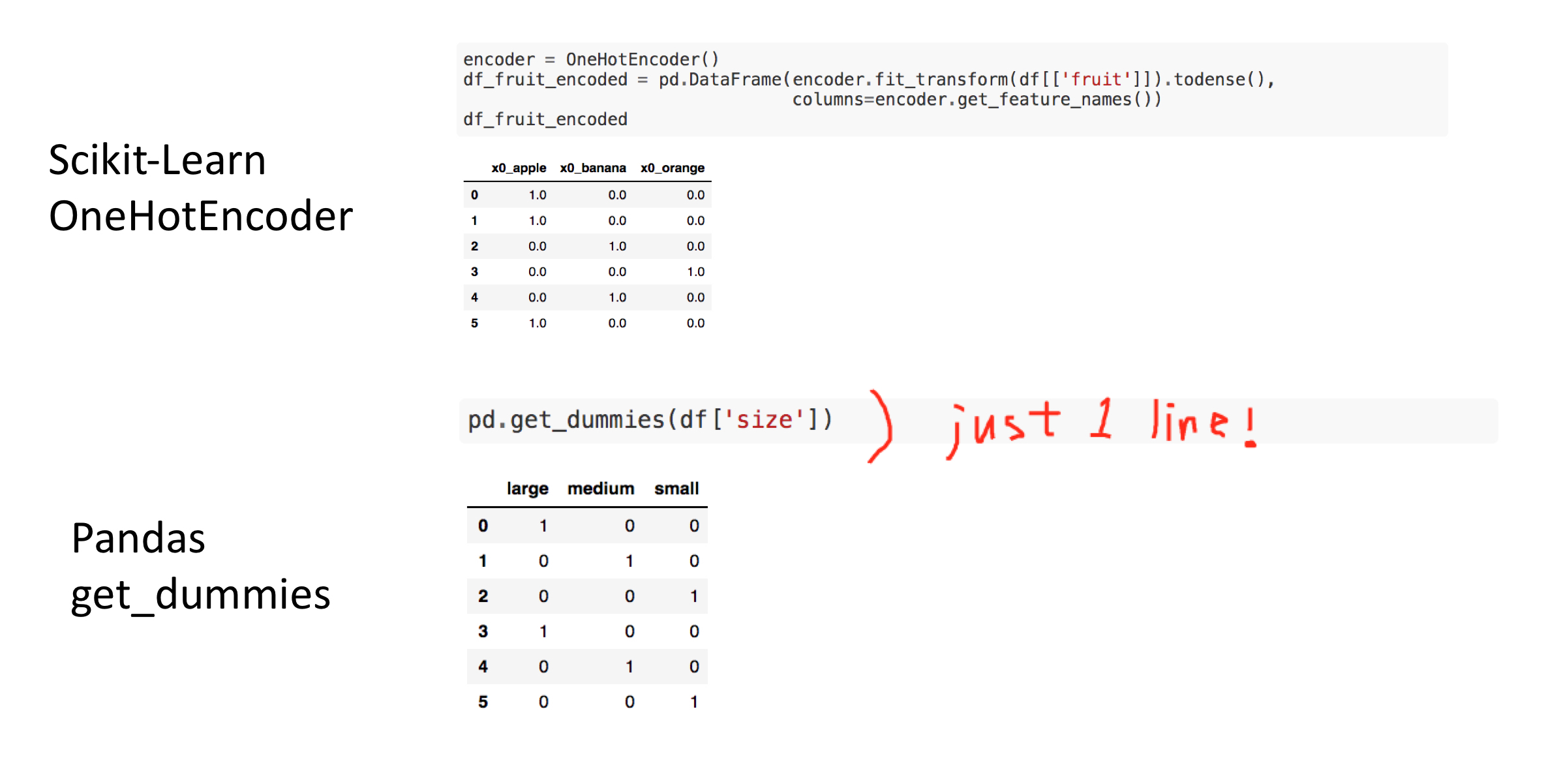
This post aims to introduce how to create one-hot-encoded features for categorical variables. In this post, two ways of creating one hot encoded features: OneHotEncoder in scikit-learn and get_dummies in pandas.
Peronally, I like get_dummies in pandas since pandas takes care of columns names, type of data and therefore, it looks cleaner and simpler with less code.
Reference
import tempfile
temp_file = tempfile.NamedTemporaryFile()
temp_file.name
!ls -a /var/folders/9_/tl0k78wd62xchzsh_4x4bz0h0000gn/T/ | grep tmp7
temp_dir = tempfile.TemporaryDirectory()
temp_dir.name
!ls /var/folders/9_/tl0k78wd62xchzsh_4x4bz0h0000gn/T/ | grep tmpje
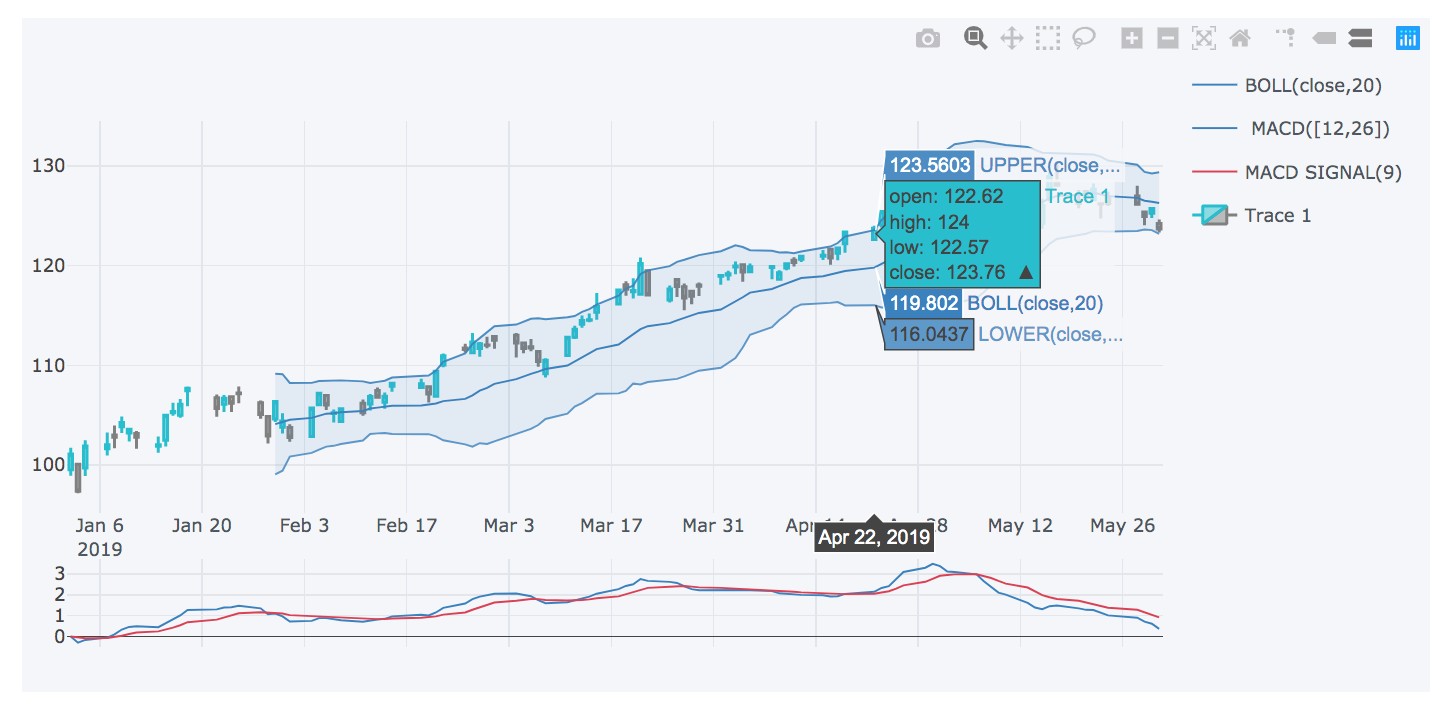
This post aims to introduce how to get real time stock market data using Yahoo finance API yahoo_fin and visualize it as candle chart using cufflinks.
Reference
This post aims to introduce how to calculate the average, variance and standard deviation of matrix using pandas.
import pandas as pd
import numpy as np
n = 1000
df = pd.DataFrame({'rand': np.random.rand(n),
                   'randint': np.random.randint(low=0, high=100, size=n),
                   'randn': np.random.randn(n),
                   'random_sample': np.random.random_sample(size=n),
                   'binomial': np.random.binomial(n=1, p=.5, size=n),
                   'beta': np.random.beta(a=1, b=1, size=n),
                   })
df.head()
df.mean()
df.var()
df.std()
describe
df.describe()
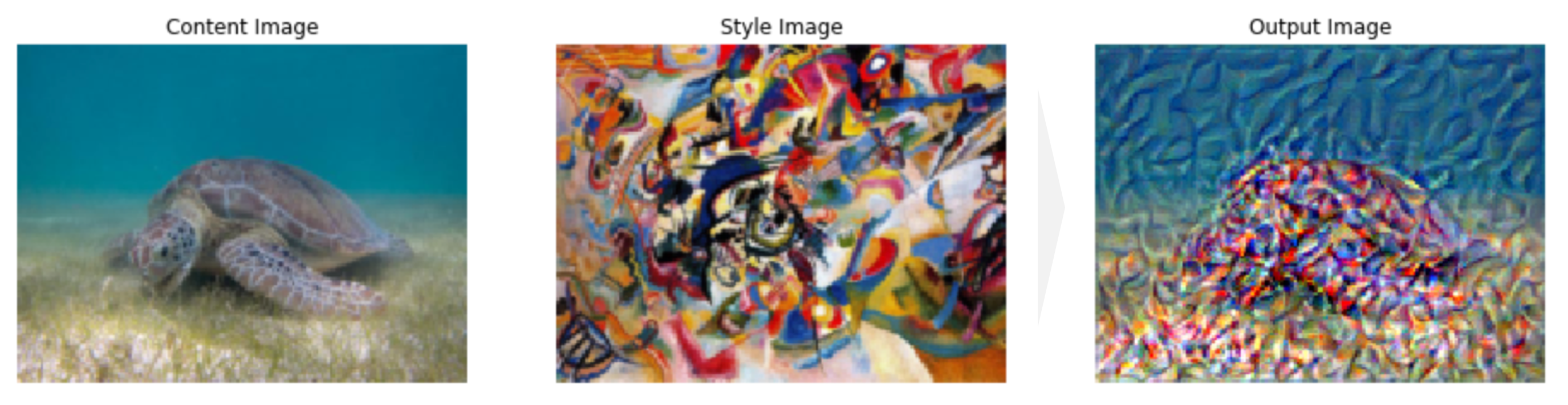
This post aims to explain the concept of style transfer step-by-step. Part 4 is about executing the neural transfer.
Reference
import pandas as pd
import copy

# Torch & Tensorflow
import torch
import torch.nn as nn
import torch.nn.functional as F
import torchvision
import tensorflow as tf

# Visualization
from torchviz import make_dot
from PIL import Image
import matplotlib.pyplot as plt
%matplotlib inline

import warnings
device = torch.device("cuda" if torch.cuda.is_available() else "cpu")
# desired size of the output image
imsize = (512, 512) if torch.cuda.is_available() else (128, 128)  # use small size if no gpu

loader = torchvision.transforms.Compose([
    torchvision.transforms.Resize(imsize),  # scale imported image
    torchvision.transforms.ToTensor()])  # transform it into a torch tensor

def image_loader(image_name):
    image = Image.open(image_name)

    # fake batch dimension required to fit network's input dimensions
    image = loader(image).unsqueeze(0)
    return image.to(device, torch.float)
unloader = torchvision.transforms.ToPILImage()

def imshow_tensor(tensor, ax=None):
    image = tensor.cpu().clone()  # we clone the tensor to not do changes on it
    image = image.squeeze(0)      # remove the fake batch dimension

    image = unloader(image)
    if ax:
        ax.imshow(image)
    else:
        plt.imshow(image)
class ContentLoss(nn.Module):

    def __init__(self, target,):
        super(ContentLoss, self).__init__()
        self.target = target.detach()

    def forward(self, input):
        self.loss = F.mse_loss(input, self.target)
        return input

def gram_matrix(input):
    # Get the size of tensor
    # a: batch size
    # b: number of feature maps
    # c, d: the dimension of a feature map
    a, b, c, d = input.size()

    # Reshape the feature
    features = input.view(a * b, c * d)

    # Multiplication
    G = torch.mm(features, features.t())

    # Normalize
    G_norm = G.div(a * b * c * d)
    return G_norm

class StyleLoss(nn.Module):

    def __init__(self, target_feature):
        super(StyleLoss, self).__init__()
        self.target = gram_matrix(target_feature).detach()

    def forward(self, input):
        G = gram_matrix(input)
        self.loss = F.mse_loss(G, self.target)
        return input
cnn_normalization_mean = torch.tensor([0.485, 0.456, 0.406]).to(device)
cnn_normalization_std = torch.tensor([0.229, 0.224, 0.225]).to(device)

# create a module to normalize input image so we can easily put it in a
# nn.Sequential
class Normalization(nn.Module):
    def __init__(self, mean, std):
        super(Normalization, self).__init__()
        # .view the mean and std to make them [C x 1 x 1] so that they can
        # directly work with image Tensor of shape [B x C x H x W].
        # B is batch size. C is number of channels. H is height and W is width.
        self.mean = torch.tensor(mean).view(-1, 1, 1)
        self.std = torch.tensor(std).view(-1, 1, 1)

    def forward(self, img):
        # normalize img
        return (img - self.mean) / self.std
# desired depth layers to compute style/content losses :
content_layers_default = ['conv_4']
style_layers_default = ['conv_1', 'conv_2', 'conv_3', 'conv_4', 'conv_5']

def get_style_model_and_losses(cnn, normalization_mean, normalization_std,
                               style_img, content_img,
                               content_layers=content_layers_default,
                               style_layers=style_layers_default):
    cnn = copy.deepcopy(cnn)

    # normalization module
    normalization = Normalization(normalization_mean, normalization_std).to(device)

    # just in order to have an iterable access to or list of content/syle
    # losses
    content_losses = []
    style_losses = []

    # assuming that cnn is a nn.Sequential, so we make a new nn.Sequential
    # to put in modules that are supposed to be activated sequentially
    model = nn.Sequential(normalization)

    i = 0  # increment every time we see a conv
    for n_child, layer in enumerate(cnn.children()):
#         print()
#         print(f"n_child: {n_child}")
        if isinstance(layer, nn.Conv2d):
            i += 1
            name = 'conv_{}'.format(i)
        elif isinstance(layer, nn.ReLU):
            name = 'relu_{}'.format(i)
            # The in-place version doesn't play very nicely with the ContentLoss
            # and StyleLoss we insert below. So we replace with out-of-place
            # ones here.
            layer = nn.ReLU(inplace=False)
        elif isinstance(layer, nn.MaxPool2d):
            name = 'pool_{}'.format(i)
        elif isinstance(layer, nn.BatchNorm2d):
            name = 'bn_{}'.format(i)
        else:
            raise RuntimeError('Unrecognized layer: {}'.format(layer.__class__.__name__))

        model.add_module(name, layer)
#         print(f'Name: {name}')
        if name in content_layers:
#             print(f'Add content loss {i}')
            # add content loss:
            target = model(content_img).detach()
            content_loss = ContentLoss(target)
            model.add_module("content_loss_{}".format(i), content_loss)
            content_losses.append(content_loss)

        if name in style_layers:
#             print(f'Add style loss {i}')
            # add style loss:
            target_feature = model(style_img).detach()
            style_loss = StyleLoss(target_feature)
            model.add_module("style_loss_{}".format(i), style_loss)
            style_losses.append(style_loss)

    # now we trim off the layers after the last content and style losses
    for i in range(len(model) - 1, -1, -1):
        if isinstance(model[i], ContentLoss) or isinstance(model[i], StyleLoss):
            break

    model = model[:(i + 1)]

    return model, style_losses, content_losses
d_path = {}
d_path['content'] = tf.keras.utils.get_file('turtle.jpg','https://storage.googleapis.com/download.tensorflow.org/example_images/Green_Sea_Turtle_grazing_seagrass.jpg')
d_path['style'] = tf.keras.utils.get_file('kandinsky.jpg','https://storage.googleapis.com/download.tensorflow.org/example_images/Vassily_Kandinsky%2C_1913_-_Composition_7.jpg')
style_img = image_loader(d_path['style'])[:, :, :, :170]
content_img = image_loader(d_path['content'])[:, :, :, :170]
input_img = content_img.clone()

assert style_img.size() == content_img.size(), \
    "we need to import style and content images of the same size"
# Obtain the model for style transfer
# with warnings.catch_warnings():
warnings.filterwarnings("ignore")
cnn = torchvision.models.vgg19(pretrained=True).features.to(device).eval()
model, style_losses, content_losses = get_style_model_and_losses(cnn, cnn_normalization_mean, cnn_normalization_std, style_img, content_img)
L-BFGS stands for Limited-memory Broyden–Fletcher–Goldfarb–Shanno according to wiki - Limited-memory_BFGS, which is one of the optimization algorithm using limited amount of memory.
def get_input_optimizer(input_img):
    # this line to show that input is a parameter that requires a gradient
    optimizer = torch.optim.LBFGS([input_img.requires_grad_()])
    return optimizer

optimizer = get_input_optimizer(input_img)
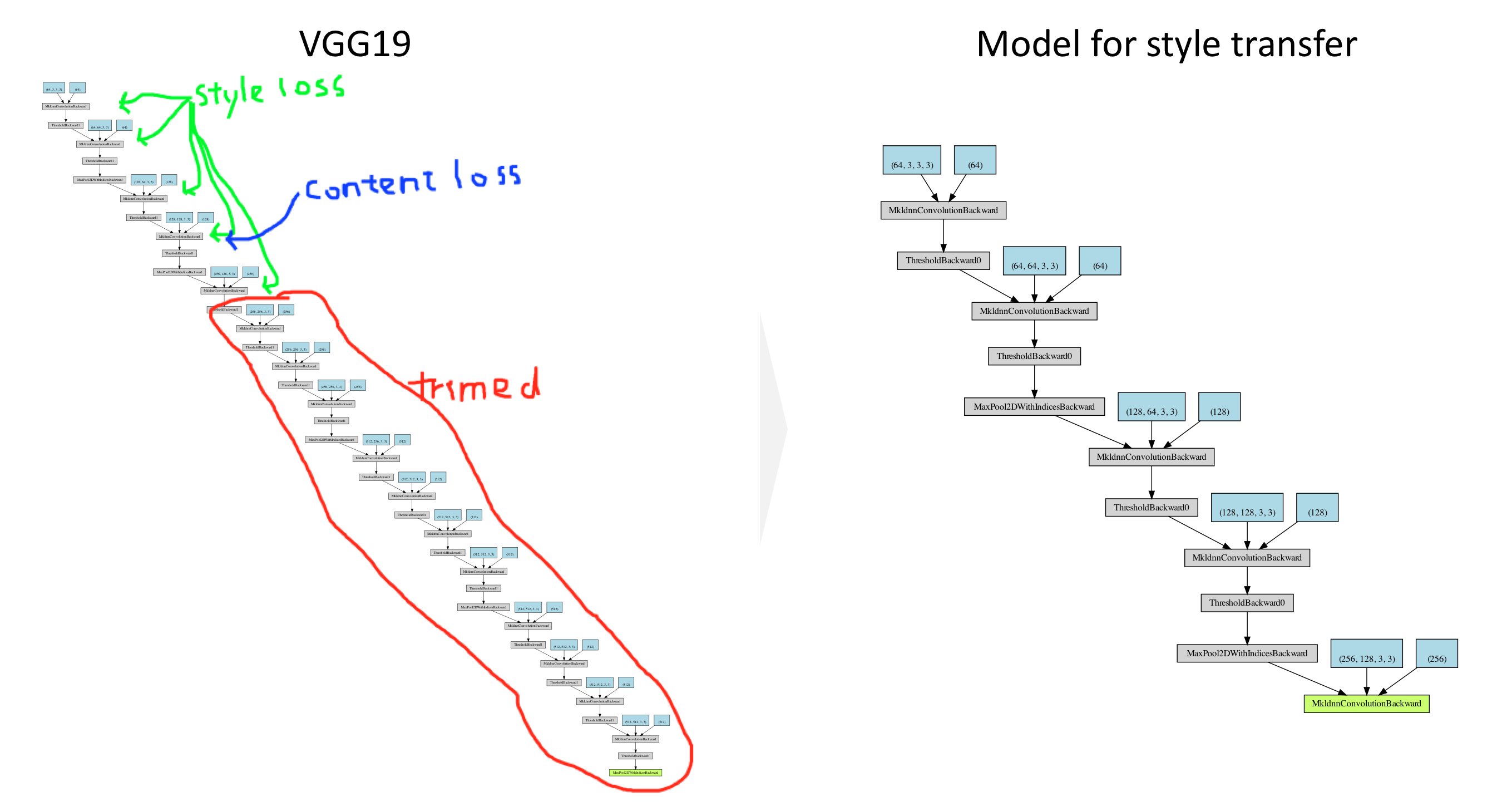
The execution steps in the function get_style_model_and_losses in NEURAL TRANSFER USING PYTORCH are as follows:
closure function to re-evaluate the model to execute the followings:.clamp methodzero_grad method# Parameters
num_steps = 10
style_weight=5000
content_weight=1
input_img = content_img[:, :, :, :170].clone()
d_images = {}
print('Building the style transfer model..')
model, style_losses, content_losses = get_style_model_and_losses(cnn,
cnn_normalization_mean, cnn_normalization_std, style_img, content_img)
optimizer = get_input_optimizer(input_img)
# Execution
run = [0]
while run[0] <= num_steps:
def closure():
# correct the values of updated input image
input_img.data.clamp_(0, 1)
optimizer.zero_grad()
model(input_img)
style_score = 0
content_score = 0
for sl in style_losses:
style_score += sl.loss
for cl in content_losses:
content_score += cl.loss
style_score *= style_weight
content_score *= content_weight
loss = style_score + content_score
loss.backward()
run[0] += 1
if run[0] % 2 == 0:
print("run {}:".format(run))
print('Style Loss : {:4f} Content Loss: {:4f}'.format(
style_score.item(), content_score.item()))
input_img.data.clamp_(0, 1)
d_images[run[0]] = input_img
print()
return style_score + content_score
optimizer.step(closure)
# a last correction...
input_img.data.clamp_(0, 1)
fig, axes = plt.subplots(1, 3, figsize=(16, 8))
d_img = {"Content": content_img,
         "Style": style_img,
         "Output": input_img}
for i, key in enumerate(d_img.keys()):
    imshow_tensor(d_img[key], ax=axes[i])
    axes[i].set_title(f"{key} Image")
    axes[i].axis('off')

This is not yet obvious to see the processes of style transfer. It seems run 2 already finish most of the transfer processes. This needs to be investigated later.
fig, axes = plt.subplots(int(len(d_images)/2), 2, figsize=(16, 20))
for i, key in enumerate(d_images.keys()):
    imshow_tensor(d_images[key], ax=axes[i//2][i%2])
    axes[i//2][i%2].set_title("run {}:".format(key))
    axes[i//2][i%2].axis('off')

This post aims to explain the concept of style transfer step-by-step. Part 3 is about building a modeling for style transfer from VGG19.
Reference
This post aims to explain the concept of style transfer step-by-step. Part 2 is about loss functions.
Reference
import pandas as pd

# Torch & Tensorflow
import torch
import torch.nn as nn
import torch.nn.functional as F
import tensorflow as tf

# Visualization
from PIL import Image
import matplotlib.pyplot as plt
%matplotlib inline
Content loss is calculated using MSE (Mean Square Error) between the content images and the output image:
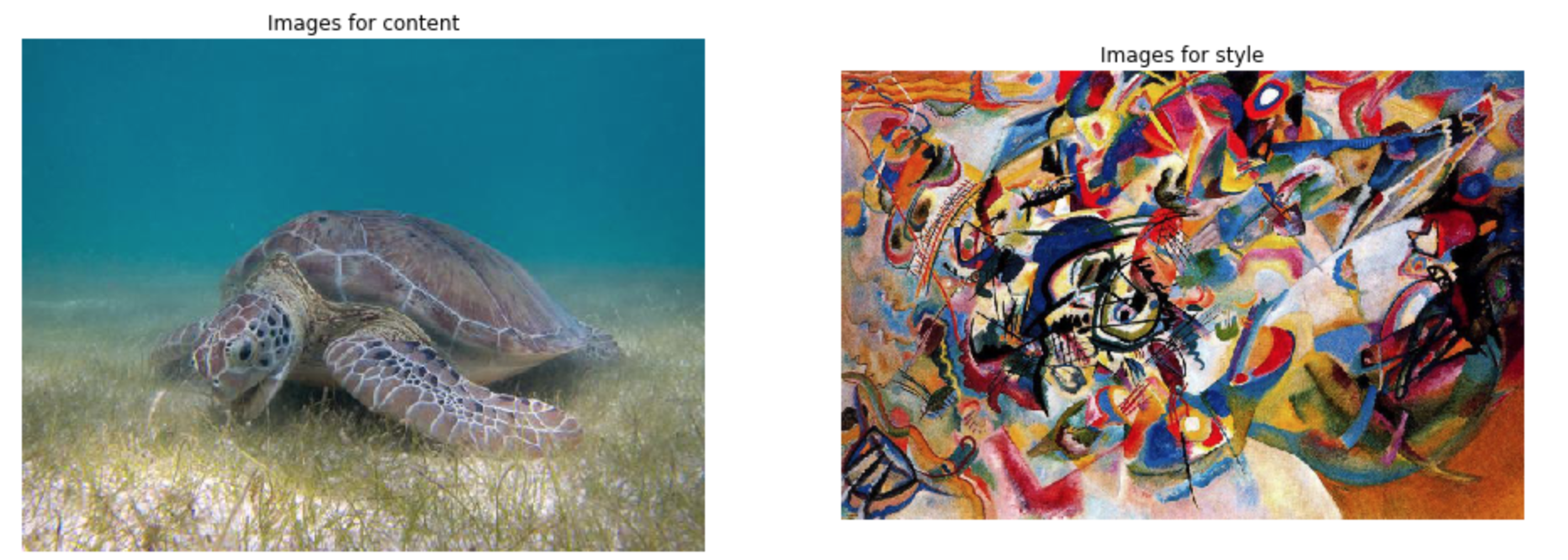
$$MSE = \frac{1}{n} \sum^{n}_{i=1} (Y_{content} - Y_{output})^2$$This post aims to follow the tutorial NEURAL TRANSFER USING PYTORCH step-by-step. Part 1 is about image loading. The following images for content and style are loaded as PyTorch tensor.
Reference